SuperbCalc
Languages
- English
- Italiano
By courtesy of
Google Translate:
 SuperbCalc™
is a tape calculator software (also called "financial calculator", "desk calculator" or
"adding machine") written in Java™. Doing calculations with SuperbCalc
is as easy as with your classic tape calculator, but with more
advanced features.
SuperbCalc™
is a tape calculator software (also called "financial calculator", "desk calculator" or
"adding machine") written in Java™. Doing calculations with SuperbCalc
is as easy as with your classic tape calculator, but with more
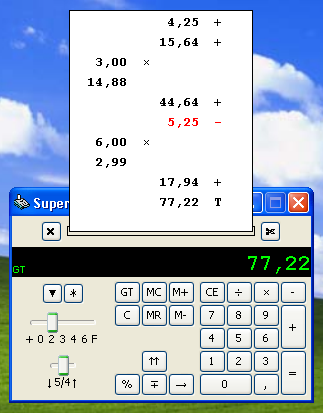
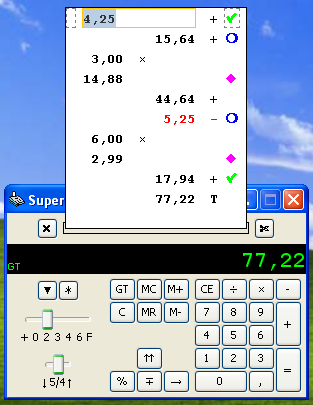
advanced features.You have your tape of paper that gets written, showing you the full history of the calculations made, and you can print it with your printer, you can cut it and also throw it away.
But you can also insert comments, check/uncheck each line, copy & paste a single number or a whole tape into your preferred word processing or spreadsheet application, and more.
With SuperbCalc you can correct the numbers directly in the tape, and it will automatically recalculate the whole tape!
Features
- Calculations are made with arbitrary-precision signed decimal numbers matching the IEEE 754R standard (the maximum precision is 64 bits, corresponding to 15-16 significant digits).
- It can use its full decimal precision or rounding with 0, 2, 3, 4 or 6 decimals.
- Three rounding modes: down, half-up and up.
- Percent calculations.
- Memory functions.
- Grand Total function.
- Annotations can be made on every line of the tape.
- Each line can be checked/unchecked. Four check symbols available of different colors.
- The tape automatically expands to use all the space available on your screen and shows a scrollbar when there's no more space.
- Two colors tape writing.
- The SuperbCalc keyboard layout mimics your computer keyboard layout.
- Main menu for easy access to all the functions.
- Virtually unlimited tape length.
- Virtually unlimited number of cut tapes on screen.
- Tape printing, with print preview and page setup.
- Save tape on a file, open a file in a new tape.
- Clipboard operations, either with the single number on the display, a single line of the tape or the whole tape.
- Saved files can be opened by most spreadsheets, specifying to use the TAB character as separator.
- Saved files can be opened by most word processors, and tables can be automatically created from them.
- Tapes copied in the clipboard can be pasted directly in most spreadsheets and word processors.
- Integrated software update via Internet. Can use a proxy server.
- The look and feel is configurable.
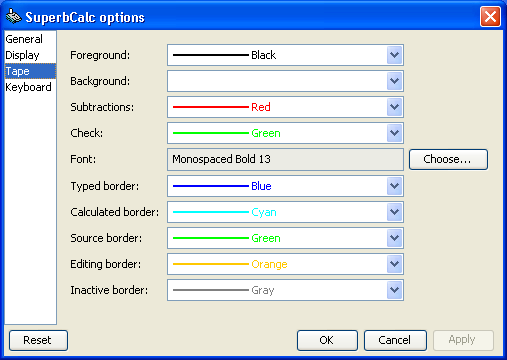
- All the colors and fonts are configurable.
- The numeric system used is configurable: European, Arabic, Devanagari and others (the fonts chosen must support it).
- The locale is configurable.
- The tape is editable, with automatic recalculation.
Usage
SuperbCalc can be operated with your computer keyboard using the numeric keypad and nearby keys. In fact, the SuperbCalc main interface mimics the right part of your keyboard, to help typing. There's no need to use the mouse for the most common operations (you can still use it if you want, though). A context menu shows all the available operations at a glance.
Like any other "adding machine", SuperbCalc requires you to press an operational button after any number that you enter, for example to calculate (5+8) you must press the following keys in sequence: 5 + 8 + =
See the integrated help to see some example of the calculations that SuperbCalc can perform with their corresponding key presses.
Screen shots
Click an image below to see the screen shot at full size. |
 |
 |
| Text comments to
ease readability |
Floating tapes,
checked lines, show dependencies |
Main menu |
 |
 |
 |
| Using the Arabic
numeric system |
The configuration
dialog |
Modifying
the tape and different check symbols |
Download
Click here to download the version 1.08 for free (686 KB).SuperbCalc requires the Java Runtime Environment (JRE) 5 or later to run, you can download it for free from the Sun Java website.
License
The full license can be seen here.In simple words: SuperbCalc is copyrighted software, you can use it for free for personal or commercial use, but redistribution is not permitted. See the actual license for details.
Installation
SuperbCalc doesn't need to be installed. Click on the link above to download the software and save the file somewhere on your disk (for example your Desktop). If Java is correctly installed you can just double-click the SuperbCalc icon to launch the program.SuperbCalc should work on any Java enabled operating system, such as Windows® 7/Vista/XP/2000/Me/98, Linux® (better with Gnome® or KDE®), Solaris™ and Mac OS® X.
Contact
For any question, clarification, bug or typo, contact me at the following address: superbcalc@mariottini.net or visit the SuperbCalc Community Forum.Trade Marks
SuperbCalc™ is a trademark of Roberto Mariottini. For more information, please read this notice.Java™ and Solaris™ are trademarks of
Windows® is a trademark of Microsoft Corp.
Linux® is a trademark of Linus Torvalds.
Gnome® is a trademark of the GNOME Foundation.
KDE® is a trademark of KDE e.V.
Mac OS® is a trademark of Apple Computer Inc.
SuperbCalc uses my free Java components, utilities and libraries, distributed under a BSD-like license.